Stereo's Academy — Beginner level — Reading time: approximately 8 minutes
New from Stereo's: Digital-to-Analog Audio DAC: connect modern devices to your Hi-Fi amplifier
See our new product
Do you own a recent television, TV box, CD player, games console or media player with a digital audio output, while your amplifier only has analogue RCA inputs? This is a very common problem. Modern devices increasingly speak “digital”, while many excellent Hi-Fi systems still expect an analogue signal.
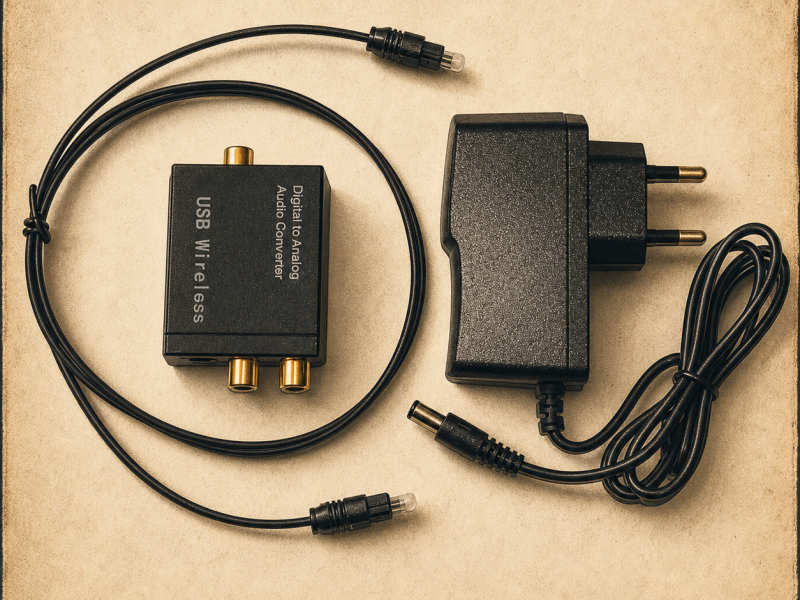
To solve this without replacing perfectly good equipment, Stereo's Store is adding a digital-to-analogue audio converter to its range. It accepts an optical Toslink or coaxial S/PDIF signal and converts it into stereo analogue audio through two RCA outputs. A mains power supply and Toslink optical cable are included for quick installation.
If you are still not sure why you need this DAC, the person who keeps turning up the volume will explain it.
Contents
What is a DAC?
DAC stands for Digital-to-Analogue Converter. It turns a digital audio stream into an analogue signal that can be used by a traditional amplifier, Hi-Fi system or powered speakers with RCA inputs.
TV, box, console or CD player → optical or coaxial cable → DAC → RCA cable → Hi-Fi amplifier or powered speakers
A DAC is not a power amplifier. It simply converts one audio format into another so that a digital source and an analogue system can communicate.
↑ Back to contents
Why are RCA outputs disappearing from modern devices?
For decades, televisions and disc players used red and white RCA sockets. Many recent devices have replaced them with optical Toslink, HDMI ARC/eARC or coaxial S/PDIF outputs.
This simplifies connectivity and supports modern home-cinema formats, but it creates a problem for owners of traditional stereo amplifiers, particularly vintage models without digital inputs.
Replacing a good amplifier simply because it lacks an optical input is rarely necessary. A compact DAC provides a simpler and more economical solution.
↑ Back to contents
How does this converter work?
The converter receives digital audio through an optical Toslink or coaxial S/PDIF input. It then converts the signal into two-channel analogue audio and sends it through the left and right RCA outputs.
Connect those outputs to an AUX, CD, TUNER, LINE or TAPE input on the amplifier.
Never connect the DAC to a PHONO input. A phono input is designed for the very low-level signal from a turntable cartridge and applies special equalisation.
↑ Back to contents
When should you use this DAC?
Connecting a television to a Hi-Fi amplifier
This is the most common use. The TV has an optical output, while the amplifier only has analogue RCA inputs. The DAC sits between them and allows TV programmes, films and streaming apps to play through the Hi-Fi system.
Connecting a TV box to a stereo system
Some TV receivers and set-top boxes include an optical or coaxial output. Their audio can be sent directly to the DAC and then to the amplifier.
Using a CD player with an analogue amplifier
A CD player or CD transport may have an optical or coaxial digital output. The DAC converts that signal into analogue RCA audio for the amplifier.
Depending on the installation, audio can be taken from the television's optical output or from a suitable HDMI audio extractor, then sent to the DAC.
Connecting powered speakers
The DAC can also feed powered speakers with RCA inputs. In that case, a separate amplifier is not required.
↑ Back to contents
Which devices are compatible?
This type of DAC is suitable for many devices equipped with an optical Toslink or coaxial S/PDIF output:
- Samsung, LG, Sony, Philips, Panasonic, TCL and Hisense televisions;
- compatible TV boxes and set-top receivers;
- CD, DVD and Blu-ray players;
- games consoles and media players;
- Apple TV, Nvidia Shield and similar devices when audio is routed through the television's optical output;
- Hi-Fi amplifiers, stereo systems and powered speakers with line-level RCA inputs.
The brand matters less than the available connections and the digital audio format. Check that the source has Toslink or coaxial S/PDIF and can output stereo PCM.
↑ Back to contents
What about network streamers?
Most mainstream network streamers, including many models from WiiM, Bluesound, Eversolo and Cambridge Audio, already contain a DAC and provide analogue RCA outputs. In that situation, adding this converter usually makes no sense: connect the streamer directly to the amplifier.
An external DAC is useful with a digital-only network transport that has no analogue output.
↑ Back to contents
How to connect the DAC
- Switch off the equipment.
- Connect the source's Toslink or coaxial output to the corresponding DAC input.
- Connect the DAC's RCA outputs to an AUX, CD, TUNER, LINE or TAPE input on the amplifier.
- Connect the DAC's mains power supply.
- Switch on the source, DAC and amplifier.
- Select the correct input on the amplifier.
- If necessary, choose the optical output and PCM format in the source's audio menu.
The included Toslink cable provides the optical digital connection. A stereo RCA cable may also be required to connect the DAC to the amplifier, depending on the exact pack contents.
↑ Back to contents
Audio settings to check
Select PCM or stereo PCM
A simple stereo converter is generally designed for two-channel PCM. If the television sends Dolby Digital, DTS, Dolby Atmos or another compressed multichannel format, the DAC may remain silent or produce abnormal noise.
Look for settings such as “Digital audio output”, “PCM / Auto / Pass-through” or “Stereo / Bitstream”, then select PCM or stereo.
The TV volume may become fixed
Many televisions provide a fixed-level optical output. In that case, adjust the volume on the amplifier or powered speakers.
↑ Back to contents
When is this DAC not suitable?
- Connecting a turntable: you need a phono preamplifier.
- Connecting a computer only through USB: choose a DAC with a USB audio input.
- Decoding Dolby Atmos, DTS-HD or multichannel sound: use a compatible decoder or AV receiver.
- Your source only has HDMI: a suitable HDMI audio extractor may be required.
- Your streamer already has RCA outputs: connect it directly to the amplifier.
- You want to use headphones: use a proper headphone output or headphone amplifier.
↑ Back to contents
Troubleshooting: what if there is no sound?
- Check that the source's optical output is enabled.
- Select stereo PCM instead of Dolby, DTS, Auto or Bitstream.
- Remove the protective caps from the Toslink cable.
- Use a line-level amplifier input, not PHONO.
- Check the DAC's power supply.
- Test another cable, source or amplifier input.
↑ Back to contents
Frequently asked questions
What does an optical-to-RCA converter do?
It converts digital audio from a Toslink output into stereo analogue audio for an amplifier or powered speakers with RCA inputs.
Can I connect a Samsung, LG or Sony TV to an old amplifier?
Yes, provided that the TV has an optical output and the amplifier has a line-level RCA input. Set the TV's digital output to PCM.
Does an optical cable carry video?
No. Toslink carries audio only.
Will the DAC automatically improve sound quality?
Its main purpose is compatibility. Overall quality also depends on the source, amplifier, speakers and recording.
No. Use AUX, CD, LINE, TUNER or TAPE.
Why is there no sound with Netflix or some TV channels?
The content may be sent as Dolby Digital. Select stereo PCM in the television's audio settings.
Will the TV remote still control the volume?
Not always. Optical outputs are often fixed-level, so volume must be adjusted on the amplifier.
What is the difference between Toslink and S/PDIF?
S/PDIF is the digital audio protocol. It can be carried by an optical Toslink cable or an electrical coaxial cable.
Is this DAC useful with a WiiM or Bluesound streamer?
Usually not when the streamer already has analogue RCA outputs. It is mainly useful with digital-only transports.
A simple way to keep using your Hi-Fi system
This converter connects modern digital equipment to an analogue amplifier or powered speakers without replacing a system that still works perfectly.
Supplied with its mains power adapter and a Toslink optical cable, it covers common situations such as connecting a TV to a Hi-Fi amplifier, recovering audio from a TV box or media player, or using the digital output of a CD player.
Before purchasing, check three points: the source has an optical or coaxial output, the amplifier has a line-level RCA input, and the source can be set to stereo PCM.
Read more
Discover more practical advice and guides in the Stereo's Store blog.
Boomer Bonus
Made it this far? Congratulations. You are one of the readers who still reads the manual all the way to the last page.
Reserved for people who love amplifiers heavier than a microwave oven. Not recommended for anyone under 45… although we will not check.
Unlock the Boomer Bonus
↑ Back to the top